
Too Long? Read This First
- To unblock a banned WhatsApp account, open the app and tap "Request a review" on the ban screen, and appeal promptly, since older cases are harder to overturn.
- Most bans come from spam, unsolicited messages, unofficial apps (GB WhatsApp, WhatsApp Plus), impersonation, or scraping.
- WhatsApp bans a large number of Indian accounts every month, with a large share flagged automatically before anyone reports them, so responsible use matters more than ever.
- Back up your chats to Google Drive or iCloud now; without a backup, end-to-end encryption means even WhatsApp can't recover your messages.
- For business messaging, the WhatsApp Business API through an official provider like Wati sharply lowers ban risk with opt-in management, pre-approved templates, and quality-rating monitoring.
If your WhatsApp account is blocked, you can usually get it back by finding out why it was banned and submitting an appeal. A block is stressful when you depend on WhatsApp to stay connected, but in most cases it can be resolved in a few steps.
This guide explains why WhatsApp bans happen, exactly how to unblock your account, how to use WhatsApp responsibly so it doesn't happen again, and how to recover your data.
Why is Your WhatsApp Account Blocked?
Most bans happen when an account violates WhatsApp’s Terms of Service. Understanding the causes makes it easier when learning how to unblock a WhatsApp account and prevent it from happening again.
Here are some of the reasons.
- Reported or Blocked by Multiple Users: If many people report or block your number, WhatsApp may flag your account for review. While a few reports may not cause an issue, repeated complaints can result in a temporary or permanent ban.
- Sending Unsolicited Messages: Messaging too many people who haven’t saved your number, or forwarding the same message repeatedly, can be seen as spam. WhatsApp may limit or block such activity to protect users from unwanted messages.
Want to know how effective your broadcasts really are? Try our Free WhatsApp Broadcast Score Calculator and optimize your campaigns for better reach and engagement! |
- Using Unofficial or Modified Apps: Third-party versions like GB WhatsApp, FM WhatsApp, or WhatsApp Plus aren’t approved by Meta. Using them can expose your data to risks and lead to a ban. Switch back to the official app from the Play Store or App Store to stay compliant.
- Impersonating Someone Else: Pretending to be another person, brand, or organization breaks WhatsApp's policies.
- Scraping User Data: WhatsApp prohibits automated tools or scripts that collect user information, such as phone numbers or profile pictures, without consent. Such activity can lead to a permanent ban.
- Other Terms of Service violations. Illegal, abusive, hateful, or misleading content, or scams, can get an account blocked without warning (Terms of Service).
Enforcement is heavier and more automated than most people realize. WhatsApp bans millions of accounts a month in India alone, around 7 to 8.5 million in recent 2026 reports under the IT Rules 2021. For example, 81.79 lakh in January 2026 and 72.14 lakh in May 2026, and roughly 20 to 25% are removed proactively by WhatsApp's own detection systems before a single user complains.
How to Unblock a WhatsApp Account?
To unblock a banned WhatsApp account, request a review from inside the app and do it quickly, because older cases are harder to overturn.
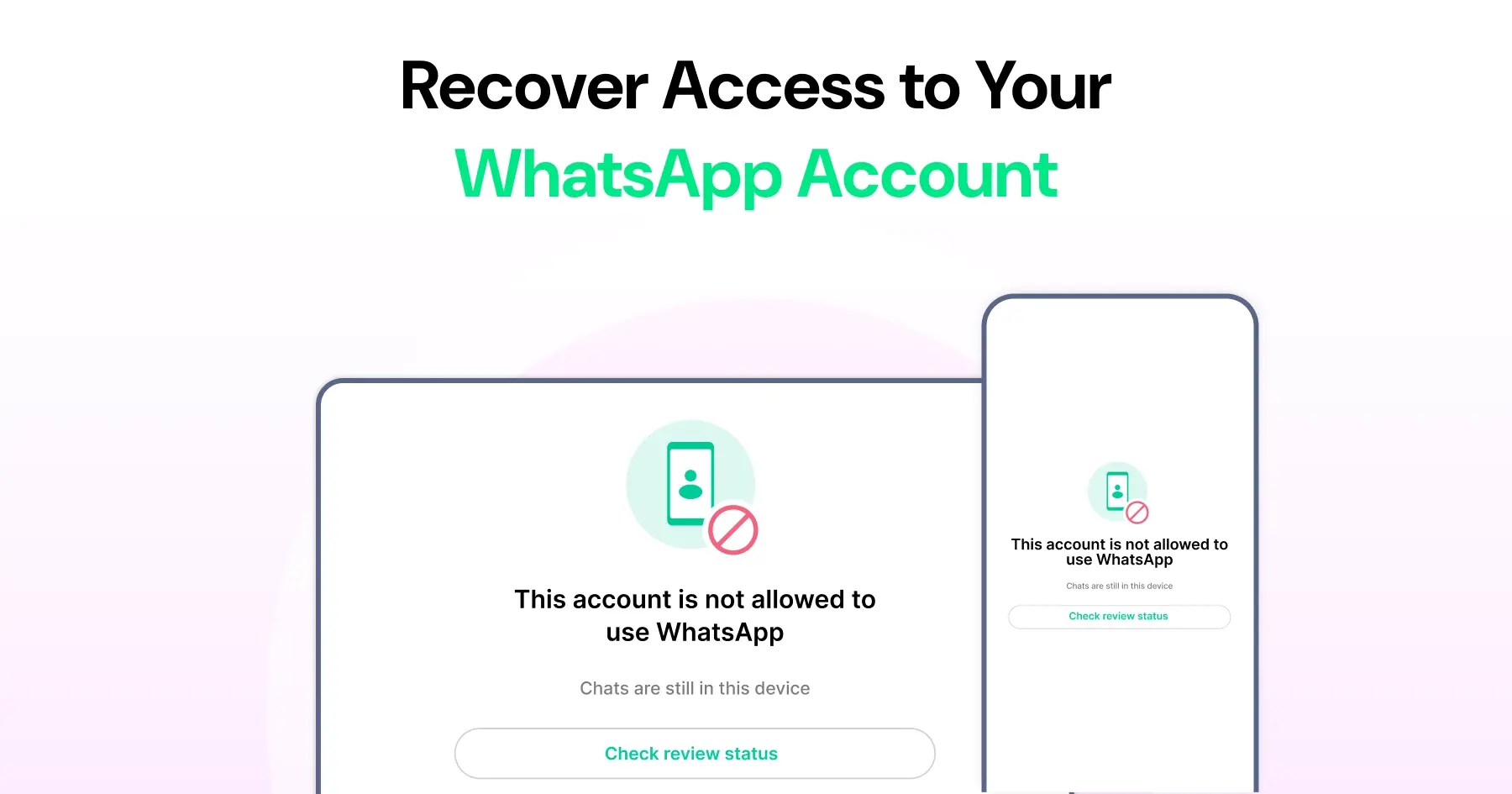
- Open WhatsApp. If you see "This account can no longer use WhatsApp," your number is banned.
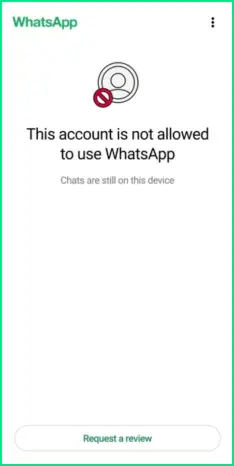
- Tap Request a review on the ban screen and follow the on-screen steps to submit your appeal.
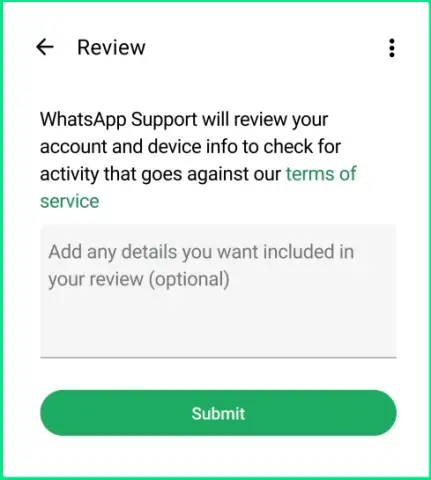
- WhatsApp reviews your account and notifies you of the decision. You can reopen WhatsApp anytime to check the status but you can't speed it up.
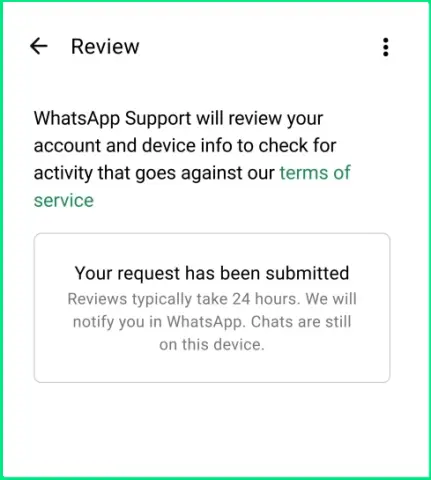
- If the appeal is approved, verify your number and your account is restored.
Two things to know:
- Appeal as soon as you can. WhatsApp doesn't publish an official deadline, but older cases are harder to overturn and temporary bans usually clear in 24–72 hours.
- Submit one clear, honest appeal — Meta generally allows a single review request per restriction.
For a WhatsApp Business API account, the appeal path is different: go to Meta Business Suite → Account Quality, find the restricted asset, and select Request Review. Wati customers can follow Wati's step-by-step guide to appeal a policy-violation ban.
How Do You Use WhatsApp Responsibly to Avoid Bans?
Using WhatsApp responsibly prevents most bans before they happen. Four habits do most of the work.
- Message people who expect to hear from you. Contact people who reached out first or asked you to, and share your number only with people you trust.
- Ask before adding to groups. Confirm someone's okay with being added, and when a person leaves a group, let them.
- Manage groups wisely. Admins can set a group so only admins post, which cuts spam. Change group settings on Android, iPhone, or WhatsApp Web via WhatsApp's Help Center.
- Think before you forward. Forwarded messages carry a "forwarded" label, and WhatsApp limits how often you can forward. If you're unsure a message is true, don't pass it on.
How Do You Stay Safe and Protect Your Account on WhatsApp?
Your safety on WhatsApp depends on how you use it. The app already includes strong privacy tools, but using them wisely makes all the difference.
- Turn on two-step verification. Add a PIN under Settings → Account → Two-step verification so no one can register your number without it, the single best protection against account takeover.
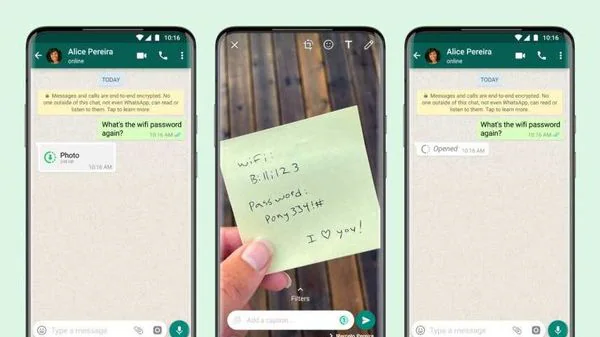
- Think before you share. Anything you send can be saved or forwarded; for sensitive photos or videos, use the View Once option so it disappears after viewing.
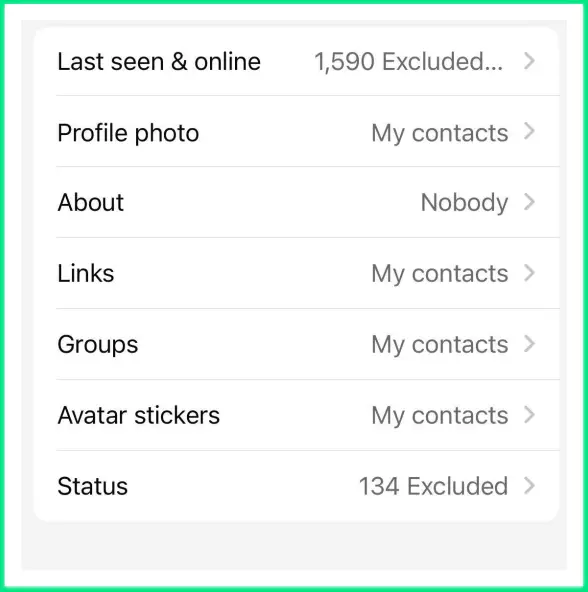
- Set your privacy. Under Settings → Privacy, choose who sees your profile photo, last seen, online status, and status updates — Everyone, My Contacts, My Contacts Except…, or Nobody. You can also silence calls from unknown numbers and control who can add you to groups.
Related Read: How to Remove Blue Ticks from WhatsApp: A Step-by-Step Guide
What If Your WhatsApp Account is Permanently Banned?
While some bans can’t be reversed, there are a few steps you can take to understand what happened and plan your next move.
Find Out Why You Were Banned
Start by checking the message you see when you open WhatsApp. It usually explains that your account can no longer use the app. Common reasons include sending spam messages, using unofficial apps, or violating WhatsApp’s Terms of Service. Knowing the cause helps you decide what to do next.
Review WhatsApp’s Terms of Service
Go through WhatsApp’s Terms of Service and related policies to understand what may have triggered the ban. Understanding these rules will help you stay compliant if you ever create a new account.
Appeal the Ban or Start Fresh
If you believe the ban was a mistake, you can request a review directly from the app by tapping Request a review on the ban screen. WhatsApp will assess your case and respond once the review is complete.
If the appeal isn’t successful, you can register a new account with a different phone number. For businesses, using the official WhatsApp Business API through an approved provider helps reduce the risk of being flagged for suspicious activity.
Note: If you run into a similar issue, these guidelines apply to both personal and WhatsApp Business accounts. The process of how to unblock WhatsApp Business account is nearly identical. |
How to Recover Data from a Blocked WhatsApp Account?
If your WhatsApp account gets blocked, it can feel like you’ve lost all your chats and photos. The truth is, you can still recover your data if you had created backups earlier.
Turn On Regular Backups
The safest way to protect your messages is by setting up automatic backups. You can save them to Google Drive if you use Android, or iCloud if you use an iPhone.
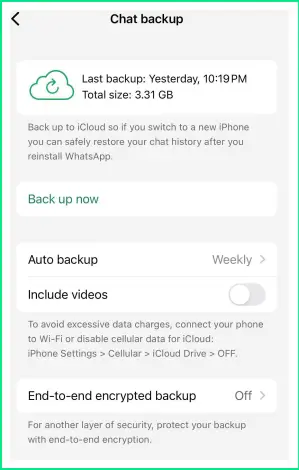
Your chats and media will stay backed up and ready to restore when you need them.
Restore from Cloud Backup
Reinstall WhatsApp and sign in using the same number and the same Google or iCloud account linked to your backup.
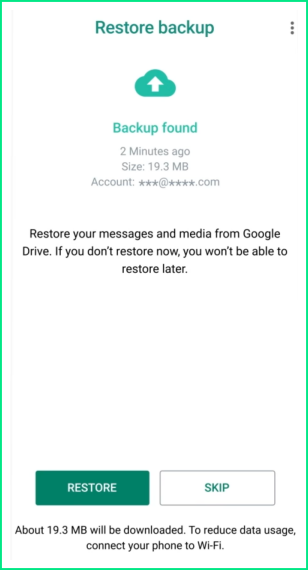
When you set it up again, WhatsApp will ask if you want to restore your chats and media. Tap Restore, and your messages will come back just as they were before.
Helpful Resource: How to Back Up & Restore WhatsApp Chats – A Complete Guide
If You Don’t Have a Backup
If you never set up a backup, your chats and media can’t be recovered. WhatsApp’s messages are protected with end-to-end encryption, which means even WhatsApp cannot access your chat history.
How Businesses Can Avoid WhatsApp Bans Altogether
For business messaging, the WhatsApp Business API through an official provider like Wati is designed to stay within WhatsApp's rules, which is why API numbers rarely face the bans that hit personal apps and manual blasting:
- Opt-in by design. The API model requires customers to opt in before you message them, which removes the biggest ban trigger, messaging people who never agreed to hear from you.
- Pre-approved templates. Business-initiated messages use templates Meta reviews in advance, so you're not sending unvetted bulk text that trips spam detection.
- Quality-rating monitoring. Wati surfaces your number's quality rating (green, yellow, red) so you can correct course before limits or a ban hit. Check campaign health with the WhatsApp Broadcast Score Calculator, and keep cadence safe with our campaign frequency guide.
It's not hypothetical. Before switching to the official WhatsApp Business API with Wati, Habuild relied on WhatsApp groups and mass-messaging tools, which frequently led to Meta blocking their messaging. After migrating to the official API, they eliminated those disruptions and scaled from a few hundred customers to over 1 million paid members across 172+ countries.
Closing Thoughts
Take a moment to check your settings, follow WhatsApp’s rules, and back up your chats regularly. Small steps like these make a big difference in keeping your account safe.
If you use WhatsApp for business, working with an official provider like Wati can help you stay compliant and manage conversations effectively. You can also use the tool to manage your Instagram conversations along with WhatsApp from a single inbox.
Start your free trial with Wati and experience how simple it is to manage customer chats, automate replies, and keep your business communication running smoothly.
Next Read: How to Use an Instagram Bot for FAQ Automation & 24/7 Support
Frequently asked questions
1. How do I unblock my WhatsApp account?
Open WhatsApp, tap "Request a review" on the ban screen, and follow the steps to submit an appeal as soon as possible after the ban. WhatsApp reviews your account and notifies you; if approved, verify your number to restore access.
2. How long does it take to unblock a WhatsApp account?
Temporary bans usually clear in 24–72 hours. Appeals for permanent bans have no fixed timeline and can't be sped up. WhatsApp doesn't publish an official deadline, but older cases are harder to overturn, so appeal promptly.
3. Will uninstalling and reinstalling WhatsApp unblock my account?
No. Reinstalling doesn't lift a ban. You have to address the cause and submit a review request through the ban screen.
4. Why was my WhatsApp account banned?
Common causes are sending spam or unsolicited messages, using unofficial apps like GB WhatsApp, impersonation, scraping data, or violating WhatsApp's Terms of Service. The ban message usually names the general reason.
5. Can I recover my chats after a ban?
Only if you had a backup. Restore from Google Drive or iCloud using the same number and account. Without a backup, end-to-end encryption means the chats can't be recovered, not even by WhatsApp.
6. How is unblocking a WhatsApp Business account different?
The principle is the same, but WhatsApp Business API accounts appeal through Meta Business Suite → Account Quality → Request Review rather than the in-app ban screen. Using an official provider like Wati, with opt-in and pre-approved templates, greatly reduces the chance of a ban in the first place.
Related posts
- WhatsApp Service Message Pricing: October Pricing Update
From October 1, 2026, Meta will start charging for WhatsApp service messages sent within the 24-hour customer service window. Learn what changes, how much it could cost, which businesses are affected, and how to keep your WhatsApp messaging costs under control.
- How to Send OTP on WhatsApp: Setup, Pricing & Zero-Tap Guide
See how WhatsApp OTP makes user verification quick and secure. It’s an easy way to speed up logins, keep accounts safe, and give customers a smoother experience.
- The Best WhatsApp API Platform for Mid-Market Sales Teams
Mid-market sales teams face immense pressure to convert leads efficiently and maintain personalized communication at scale. The fragmented nature of modern communication channels often leaves sales representatives struggling to keep pace, leading to dropped leads and missed opportunities. An exceptional WhatsApp API platform is not merely a convenience; it is a vital tool for enhancing …
- Top 5 DoubleTick Alternatives in 2026: Switch to Advanced Automation
Have you outgrown DoubleTick and are searching for alternatives with deeper automation, third-party plugins, and chatbot flexibility? You are at the right place. As your customer base grows and deals increase, you need the right DoubleTick alternatives to power smarter WhatsApp campaigns and fuel profits. While DoubleTick offers a mobile-first UI, it may not scale …